Details
Description
A virtual camera. Turned out making the overlays was easier than
expected. I could remove some duplication, but this is fine the
way it is. The real improvement to make would be to
remove the frame when the mouse is outside the images. Could also
set up so if you're on a device without a mouse the
frame doesn't show up. Things to think about for next time.
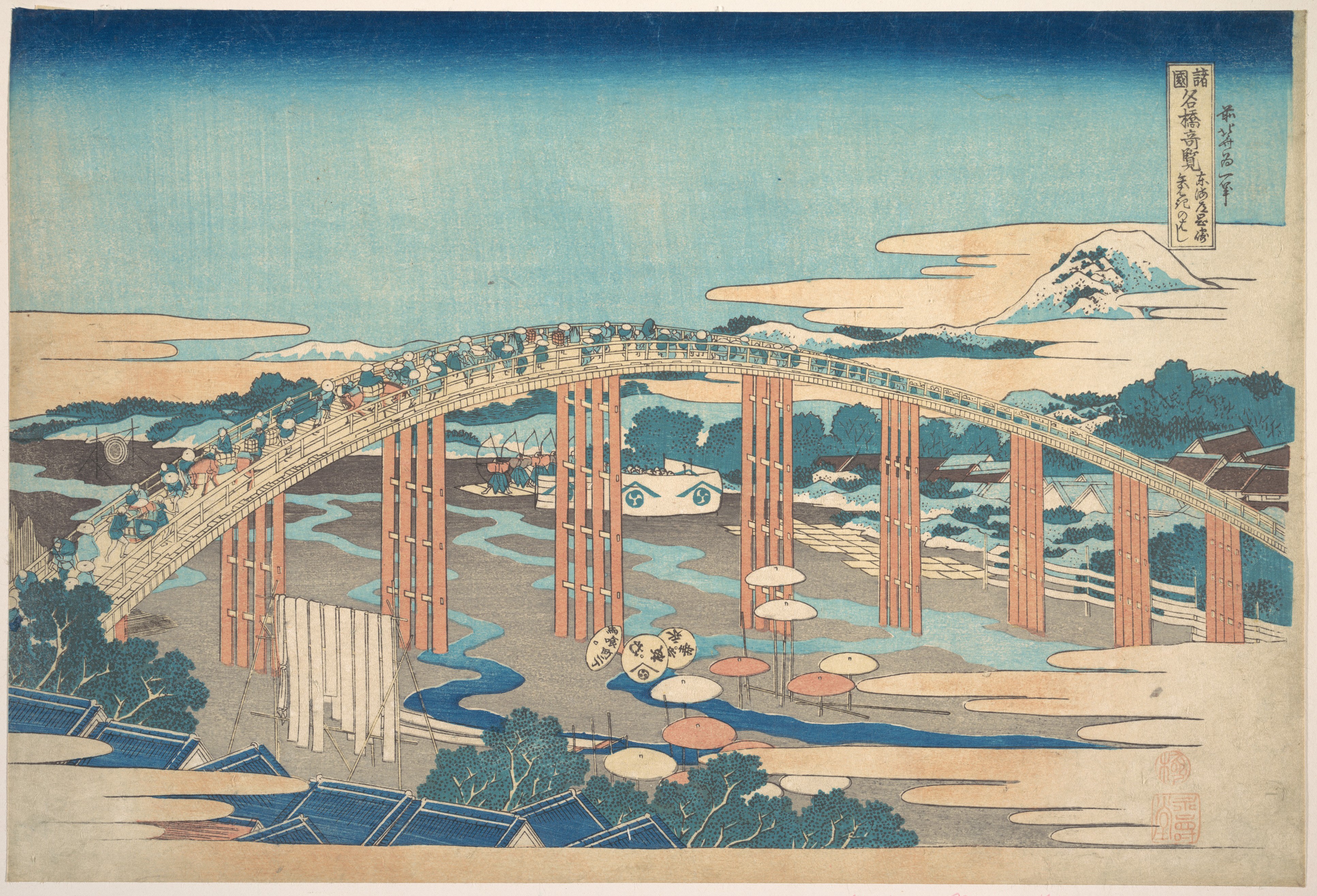
The image is "Yahagi Bridge at Okazaki on the
Tōkaidō (Tōkaidō Okazaki Yahagi no hashi), from the
series Remarkable Views of Bridges in Various
Provinces (Shokoku meikyō kiran)" from
The Met Collection.
One of thousands of public domain pieces they've
made available in high resolution.
The HTML
<bitty-1-3
  data-connect="Camera" data-send="init"
  data-width="80" data-height="60">
  <img src="/images/bridge.jpg"
    data-receive="init"
    alt="A painting titled: Yahagi Bridge at Okazaki on the
      Tōkaidō (Tōkaidō Okazaki Yahagi no hashi), from the
      series Remarkable Views of Bridges in Various
      Provinces (Shokoku meikyō kiran). It's a woodcut painting
      depciting a bridge with a high arch crossing
      a river. The bridge is full of people
      drawn with simple lines. The tip of a mountain
      appears in the upper right background. The foreground
      shows the roofs of a few houses." />
  <div data-receive="frame"></div>
  <div data-receive="picture"></div>
</bitty-1-3>
The CSS
:root {
  --frame-top: 0px;
  --frame-left: 0px;
  --frame-width: 0px;
  --frame-height: 0px;
  --picture-x: 0px;
  --picture-y: 0px;
  --picture-visibility: hidden;
}

[data-connect=Camera] {
  position: relative;
  display: block;
  width: 100%;
}

[data-connect=Camera] img {
  width: 100%;
}

[data-receive=picture] {
  margin-block: 2rem;
  background-color: var(--black);
  width: 450px;
  height: 300px;
  margin-inline: auto;
  background-image: url('/images/bridge.jpg');
  background-position: var(--picture-x) var(--picture-y);
  border: 20px solid white;
  visibility: var(--picture-visibility);
}

[data-receive=frame] {
  top: var(--frame-top);
  left: var(--frame-left);
  position: absolute;
  width: var(--frame-width);
  height: var(--frame-height);
  border: 2px solid black;
}
The JavaScript
function setProp(key, value) {
  document.documentElement.style.setProperty(key, value);
}

function setPx(key, value) {
  document.documentElement.style.setProperty(key, `${value}px`);
}

function lerpIt(a, b, ratio) {
  return a + ratio * (b - a);
}

window.Camera = class {
  bittyInit() {
    this.firstShotTaken = false;
  }

  init(event, el) {
    const t = event.target;
    setPx(`--frame-width`, t.dataset.width);
    setPx(`--frame-height`, t.dataset.height);
    const splitWidth = Math.round(t.dataset.width / 2);
    const splitHeight = Math.round(t.dataset.height / 2);
    document.addEventListener("mousemove", (event) => {
      const zoomX = Math.max(
        splitWidth,
        Math.min(
          event.pageX - this.api.offsetLeft,
          el.getBoundingClientRect().width - splitWidth,
        ),
      ) - splitWidth;
      setPx(`--frame-left`, zoomX);
      const zoomY = Math.max(
        splitHeight,
        Math.min(
          event.pageY - this.api.offsetTop,
          el.getBoundingClientRect().height - splitHeight,
        ),
      ) - splitHeight;
      setPx(`--frame-top`, zoomY);
    });

    document.addEventListener("click", (event) => {
      setProp(`--picture-visibility`, `visible`);
      const zoomX = Math.max(
        splitWidth,
        Math.min(
          event.pageX - this.api.offsetLeft,
          el.getBoundingClientRect().width - splitWidth,
        ),
      ) - splitWidth;
      const zoomY = Math.max(
        splitHeight,
        Math.min(
          event.pageY - this.api.offsetTop,
          el.getBoundingClientRect().height - splitHeight,
        ),
      ) - splitHeight;
      const bgX = lerpIt(0, el.naturalWidth, zoomX / el.clientWidth) * -1;
      const bgY = lerpIt(0, el.naturalHeight, zoomY / el.clientHeight) *
        -1;
      setPx(`--picture-x`, bgX);
      setPx(`--picture-y`, bgY);
    });
  }
};